
aTube Catcher 2026: Window Utilities To Download videos and Is It Safe to Use?
26 April 2026
138 MB
10.84
Microsoft Windows
200,000,000

Description
Introduction
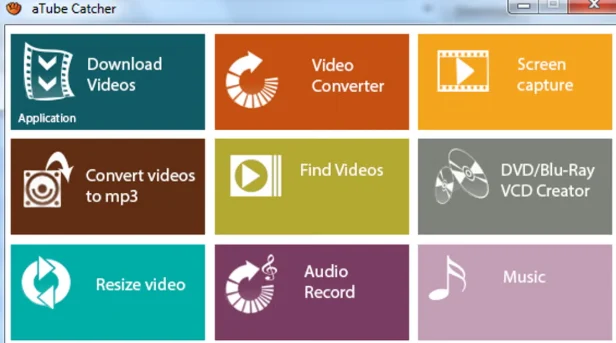
aTube Catcher is a video downloader app for windows like laptop and computers it is well famous due to it’s secret feature that many users don’t know. This is right that this the video downloading app but this have amazing features the first is off course just downloading app but the second is format converter in this feature you have a choice to convert your downloaded video into audio format this feature will help those people who use old software or their device can’t play high level videos.
Third is screen recorder this feature is use to record your screen this will help you to record the video which play on your screen, and fourth is dics-burning tool disc-burning is a process where your videos convert directly to DVD or VCD.
What Is aTube Catcher?
aTube Cather is a free Windows utility that bundles several media tools into one program: a user can use this program for several use like to download any videos by paste the link of the video which you want to download, a format converter you can convert the video into audio format, a screen recorder this feature is use to record your screen this will help you to record the video which play on your screen, and a dics-burning tool disc-burning is a process where your videos convert directly to DVD or VCD.
It’s been around since 2007, developed by Diego Uscanga under DsNET Corporation, which makes it one of the longer running tools in this space rather than a new app. It’s build for those who want to save their online videos for offline watching and convert into a format that works on whatever device they are using.
For instant download visit the official link https://www.atube.me/
Who Actually Uses aTube Catcher?
Offline Viewers
People who want to watch tutorials, lectures, or personal reference videos without depending on an internet connection and they can watch that videos whenever they want to watch.
Content Creators and Educators
Users record webinars, presentations any things they want to want rely on it’s built in recorder rather than installing a separate tool for recording.
Users with Older or Specific Devices
Because it converts to formats like 3GP, PSP-compatible video, and older audio formats, it still gets use of those people who working with legacy or old hardware device requirements.
Key Features of aTube Catcher
Video Downloading
Paste a video URL and the program detects available quality and format options. It works across a wide range of platforms like YouTube, Vimeo, Dailymotion, Facebook and dozens of other smaller or big streaming sites and supports batch downloading of entire playlists rather than one video at a time.
Format Conversion
Once downloaded (or from any file already on your computer), aTube Catcher converts between formats like MP4, AVI, WMV, 3GP, and MOV for video, and MP3, WAV, and FLAC for audio. This is useful if your device doesn’t support the original file format because this convert that specific file with low quality or audio format.
Built-in Screen Recorder
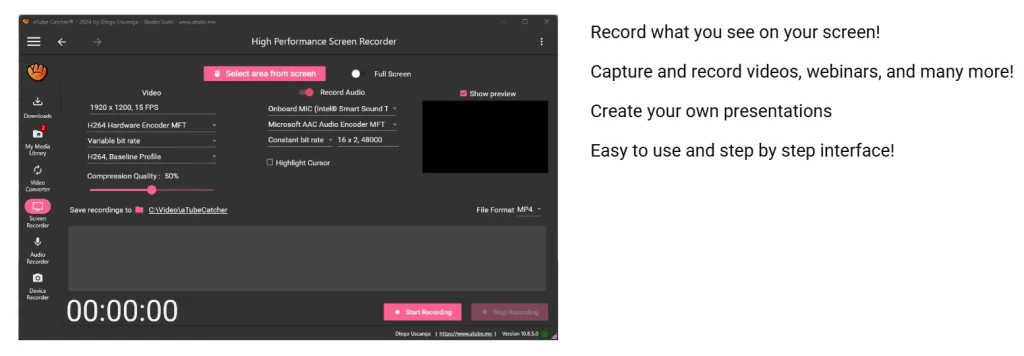
A separate mode lets you record whatever is happening on your screen this is useful for tutorials, recorded meetings, or saving video calls without needing a third party software.
Disc Burning
The program can burn your videos directly to DVD or VCD, a feature most modern downloaders have dropped but that still has a niche, mostly among users maintaining physical media collections.
StreamCatcher Mode
This advanced mode captures streaming audio or video sources directly, which is a step beyond simple URL paste downloading and appeals to more technical users.
System Requirements
- Operating System: From Windows XP to Windows 11 (32-bit and 64-bit)
- File size: Roughly 130–155 MB it’s depending on the version
- Additional components: Screen recording requires DirectX 9.0c and StreamCatcher requires WinPcap
- Platform note: aTube Catcher is design for Windows users only. There is no official macOS or Linux version, so Mac and Linux users will need an alternative tool of this app.
How to Download and Install aTube Catcher
Step 1 — Download from the Official Source
Get the installer from the official aTube Catcher website rather than a third party mirror, since this reduces the risk of a modified or bundled installer from an untrusted source or you can also visit our official website https://apkshoot.com
Step 2 — Run the Installer
After the downloading process is complete launch the setup file and install through the installation wizard.
Step 3 — Watch for Bundled Offers
During installation, the setup may present additional software offers or toolbars. These are option, so read each screen carefully and decline anything you don’t recognize or you don’t want to click, don’t just click “Next to Next” repeatedly.
Step 4 — Launch and Use
Once installed, the app shortcut will show on your desktop screen, and it has separate sections for downloading, converting, screen recording, and disc burning choose one that you want to do.
Is aTube Catcher Safe to Use?
This is the common questions that every user asks. aTube Catcher itself is a long standing, trusted program, but malware, but few honest limitations which this program has.
- It supported ads: The free installer has historically bundled optional third party offers during setup. These aren’t hidden or forced, but they do require attention during installation.
- Some review sites flag it as “adware”: It means that this platform is ad supported software and bundling behavior, not because the core program is harm.
- Download only from the official site. Because the program is popular and long running, unofficial mirrors sometimes repackage it with additional unwanted software a risk that applies to almost any long running free Windows utility, not just this one.
Note on Legal Use
Downloading videos from platforms like YouTube can conflict with that platform’s own terms of service, even when the software itself is legal to use. Whether it’s permissible in your situation typically depends on the content’s copyright status and your local laws downloading content you own the rights to, or content explicitly marked for reuse, is generally fine; downloading copyrighted material without permission is not. This is worth a short, honest disclosure both for accuracy and because it’s the kind of transparency.
ATube Catcher vs Alternatives apps
| Feature | aTube Catcher | Typical Lightweight Downloader |
| Platform | Windows only | Often cross platform |
| Extra tools | Converter, screen recorder, disc burner | Usually download-only |
| Cost | Free, ad supported | Varies |
| Interface | Dated but still functional | Often more modern |
| Best for | Users wanting an all-in-one utility | Users wanting a simple, single purpose full tool |
Pros and Cons
Pros
- All the tools are available in one platform such as downloading, converting, screen recording, and disc burning.
- Supports a very wide range of source sites and output formats
- No feature is locked behind a paywall
- Long track record and active updates
Cons
- Only for Windows , not Mac or Linux version
- Installer includes optional bundled offers that require attention
- Interface feels dated compared to newer tools
- Some users report stability issues after certain updates
Frequently Asked Questions
Is aTube Catcher free?
Yes, it’s fully free with no locked premium features, though it’s ad supported.
Does aTube Catcher work on Mac?
No, it’s Windows only. Mac users need a separate, cross platform tool.
Is aTube Catcher safe to install?
The core program is legitimate, but pay attention during installation, since the setup may offer optional bundled software you can decline.
Can aTube Catcher download from any website?
It supports a wide range of popular sites, though compatibility can vary as platforms update their own systems.
Is it legal to download videos with aTube Catcher?
That depends on the content and platform’s terms, not the software itself downloading content you have rights it is regal but downloading copyrighted material without permission generally isn’t lega
Final Verdict
aTube Catcher has its long lifespan by doing more than one job downloader, converter, screen recorder, and disc burner rolled into a single free tool. It’s not the most polished piece of software, and the bundled offers during setup mean you have to pay attention during installation, but for Windows users who want an all-in-one media utility without paying for four separate programs, it remains a best choice in 2026.
Alternative direct download links, use them if there is a problem with the web installer